
Give every course a clear way back in
A student returns to learn. Make their first page after login relevant to the course they enrolled in. With LoginWP Pro, you can choose a destination for students of a particular Tutor LMS course and guide them toward the next step you have prepared.
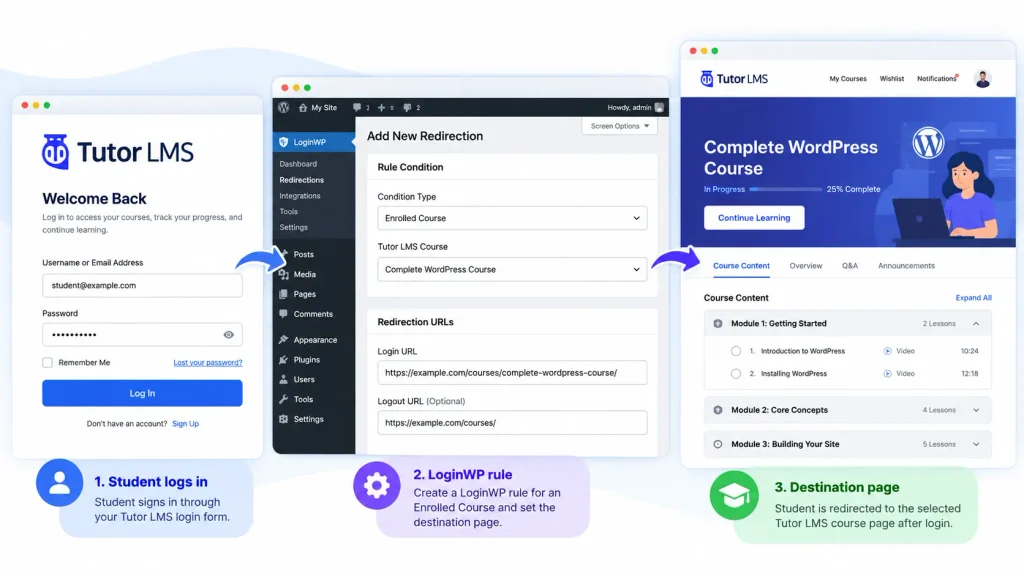
The student journey, one step at a time
Enrollment
A student is enrolled in a Tutor LMS course.
Sign-in
The student logs in through the site’s supported login flow.
Arrival
A LoginWP Enrolled Course rule sends the student to the URL you specified for that course.
Choose a destination with a job to do
Course introduction
Point students to a page that explains the course structure, resources, and what to do first.
First lesson, if accessible
Use the first lesson’s URL for enrolled students who can access it immediately.
Course homepage
Send enrolled learners to the selected course page so they can navigate its content.
Student resource hub
Use a dedicated page for links, downloads, or support information tied to that course.
From login to destination in three steps.
Choose who the rule applies to, decide when it should run, and set the destination.
- Install and activate Tutor LMS and LoginWP Pro. Have a course and destination URL ready.
- In LoginWP → Integrations, enable Tutor LMS.
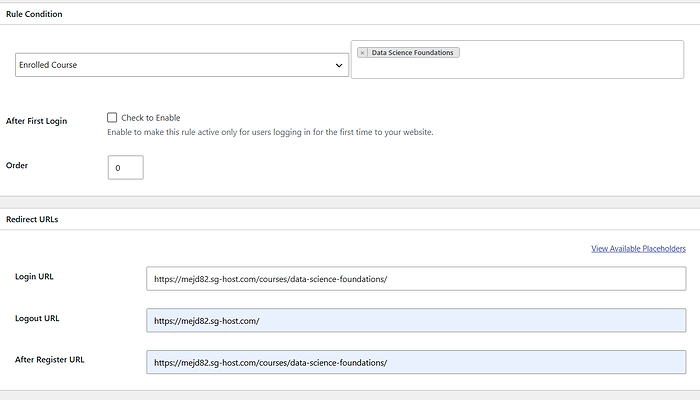
- Open LoginWP → Redirections → Add New. Under Rule Condition, select the course in Enrolled Course.
- Enter the login URL and, if wanted, a logout URL. Save the rule.
- Test with a student enrolled in the selected course and a user who is not. If students take multiple courses, test those accounts too and confirm the destination they see.
For detailed guide, read the TutorLMS integration documentation here: Redirect Tutor LMS Users After Login Based on Enrolled Course
Frequently Asked Questions
Can I redirect students based on a Tutor LMS course?
Yes. Choose Enrolled Course in a LoginWP rule and select the Tutor LMS course to target.
Can I choose where those students go after logout?
Yes. The Tutor LMS integration guide includes login and logout URL fields in the rule.
Can newly enrolled students land on lesson one after login?
You can use a fixed first-lesson URL if it is accessible to an enrolled student. The same course rule matches returning students, so it is not a first-login-only or resume-progress rule. Test with both new and returning students.
Does LoginWP take a student to their last lesson?
The documented condition matches enrollment in a selected course. Set a suitable destination, such as its course page or a resource hub; do not assume the rule tracks an individual’s last lesson.
Does LoginWP enroll students or manage course access?
No. Tutor LMS manages enrollment and course access. LoginWP chooses a post-login URL when its condition matches.
What if a student is enrolled in several courses?
Test the relevant combinations and your rule setup with real test accounts. Confirm which destination the student reaches before publishing course-specific promises.
Need Support?
Reach out to us directly: https://loginwp.com/support/
Explore LoginWP documentation
Check our Knowledge Base documentation here: https://loginwp.com/docs/
Make sign-in a step toward the course
Give Tutor LMS students a clearer starting point when they return. Choose the page, set the course-based rule, and test the journey with LoginWP Pro.