
Help learners get back to learning after login
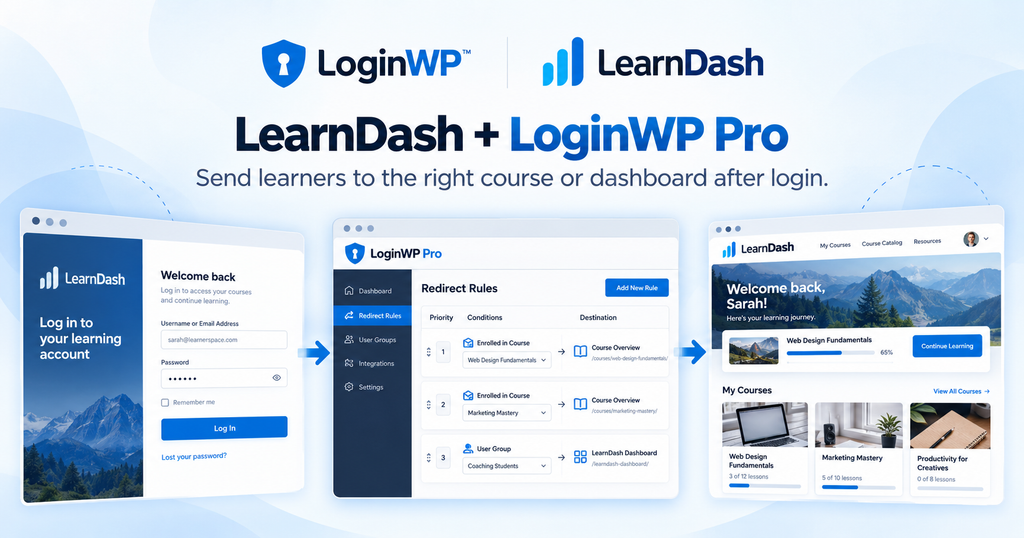
When a student signs in, the next page should have a purpose. With LoginWP Pro and LearnDash, you can send learners to a page you choose based on an enrolled course or the user group they belong to.
Built around how people learn
New course learner
After login, an enrolled student can go straight to the first lesson URL of the selected course, provided that lesson is accessible. If lessons are drip-fed or prerequisites apply, use a course welcome page instead.
Cohort participant
A member of a LearnDash group arrives at a group resource page that you created for that cohort.
Returning student
Send learners in a selected course to its overview so they can choose where to continue. An enrolled-course rule also matches returning learners, so a fixed first-lesson URL sends them back to lesson one on every login.
Set up your LearnDash redirect
- Install and activate LearnDash and LoginWP Pro. Prepare the course or group and the destination page.
- In LoginWP → Integrations, enable LearnDash.
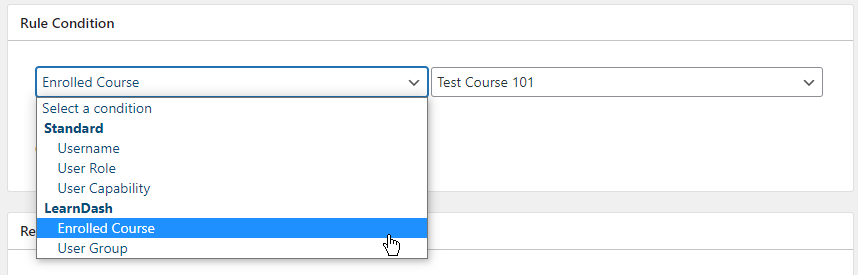
- Go to LoginWP → Redirections → Add New. Select either Enrolled Course and a course, or User Group and a group.
- Enter the login URL. Optionally add a logout URL, then save the rule.
- Test with an account that matches the course or group and one that does not. If learners belong to several courses or groups, test those combinations and confirm the resulting destination.
For detailed guide, read the LearnDash integration documentation here: Redirect LearnDash Users After Login Based on User Group
Questions from course creators
Can I redirect learners based on a particular LearnDash course?
Yes. Select Enrolled Course in a LoginWP redirect rule, choose the course, and provide the login destination.
Can I send members of a LearnDash group to a group page?
Yes. Select User Group, choose the group, and enter your group page URL as the login destination.
Can I add a logout destination?
Yes. LoginWP’s LearnDash course and user-group rule guides include fields for login and logout URLs.
Can new students go directly to their first lesson?
You can enter that lesson’s fixed URL for an Enrolled Course rule if the lesson is accessible. The rule also matches returning students. If you want a first-login-only route, configure and test LoginWP’s separate first-time-login behavior with your course rules before promising it.
Will a redirect enroll someone or unlock protected lessons?
No. LearnDash manages enrollment and access. Set the redirect to a destination the matching learner can access.
What happens if a learner qualifies for more than one rule?
Test the rules with accounts in those course and group combinations. Confirm which destination is used in your site’s configuration before you publish a promise about a particular priority.
Put every user on the right path.
Build better login, logout, and registration journeys with LoginWP.