
Give every membership a better welcome back
Your members signed up for something specific. When they return, take them closer to it. LoginWP Pro lets you redirect MemberPress users after login based on the membership they subscribe to, so their first page can fit their plan.
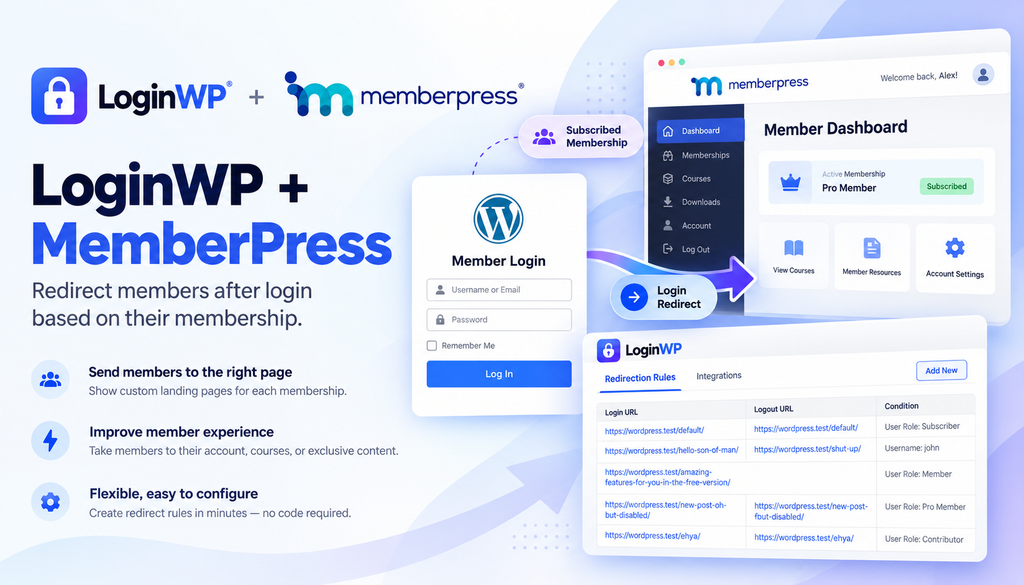
From sign-in to the right starting point
Member signs in → LoginWP checks the subscribed membership rule → Member reaches the destination you set
For example, someone on your Starter membership can arrive at a getting-started page, while someone on your Advanced membership can arrive at a different resource hub. The destinations are pages you choose and maintain on your site.
Make the first click after login count
A relevant home for each plan
Choose a destination for members with a selected MemberPress membership. Show them the resources, community entry point, or dashboard intended for their plan.
Clearer return visits
Help members resume their experience without searching through navigation for the page that matters to them.
A chosen sign-out destination
The same membership-based rule can also include a logout URL, such as a public homepage or a thank-you page.
Where could your members land?
Course membership: Send members on a selected plan to a course overview or learning hub after login. If the plan includes immediate access to a first lesson, its fixed URL can work too; returning members would also land there.
Resource library: Direct subscribers to the starting page for resources included in their membership. Keep MemberPress access rules aligned with the page.
Community access: Point members to the community welcome page that matches their membership.
Set up a MemberPress membership redirect
- Install and activate MemberPress and LoginWP Pro. Have at least one MemberPress membership and its intended destination page ready.
- Open LoginWP → Integrations and enable MemberPress.
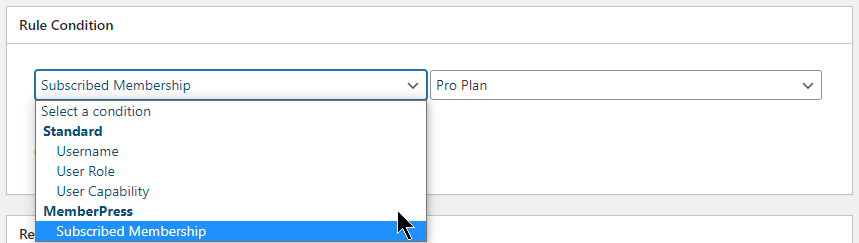
- Go to LoginWP → Redirections → Add New. Under Rule Condition, choose Subscribed Membership and select the membership to target.
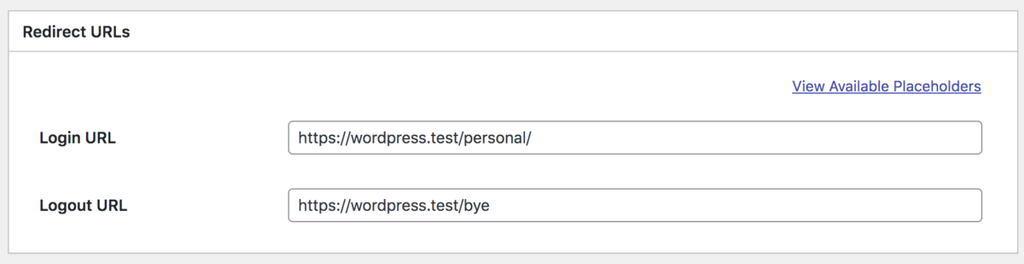
- Enter the login URL. Add a logout URL if you want one, then save the rule.
- Test with an account subscribed to that membership and another account outside it. Review other site-wide or MemberPress redirect settings if the observed destination differs from your intended one.
For detailed guide, read the MemberPress integration documentation here: Redirect WP Users After Login Based on MemberPress Membership
Target a username, role, capability, or supported integration condition.
Apply the rule after login, logout, or registration.
Enter the page or URL where the user should arrive.
MemberPress Integration FAQs
Can I set a different login page destination for each membership?
Yes. Create a LoginWP rule using Subscribed Membership and select the membership to target. Set the login destination for that rule, then configure and test additional rules for other memberships as needed.
Does LoginWP Pro replace MemberPress access rules?
No. MemberPress manages membership access. LoginWP Pro selects a destination after login based on the rule you configure; the destination page must still be accessible to that member.
Can I set a logout destination too?
Yes. LoginWP’s MemberPress rule setup accepts both login and logout URLs.
Does this work with the MemberPress login form?
LoginWP lists MemberPress among the login forms supported by its redirect rules. Test the form and destination used on your site, particularly if MemberPress also has a login redirect URL set.
What if a member belongs to more than one membership?
Create and test your rules with an account matching each combination you expect. Confirm which destination applies in your site’s current setup before publishing a promise about overlapping memberships.
Need Support?
Reach out to us directly: https://loginwp.com/support/
Explore LoginWP documentation
Check our Knowledge Base documentation here: https://loginwp.com/docs/
Put every user on the right path.
Build better login, logout, and registration journeys with LoginWP.